Building a Micro-World: Playground Pixel Art and Pathfinding Implementation
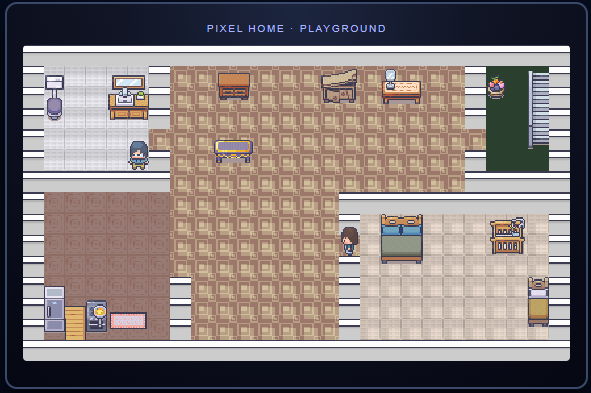
Recently, while coding, I came across an interesting project on GitHub called Pixel Agents. It simulates AI agents during coding as tiny pixel-style characters working in an office, which looks incredibly cute 😆. Because I really love pixel art, I wondered if I could bring a similar vibe to my own website. That’s how this Playground came to be.
This post will share the implementation details behind this little world, covering how to render crisp pixel art using HTML5 Canvas, designing the states for the characters, and how they navigate the room (BFS pathfinding algorithm).
The scene assets are sourced from Modern Interiors.
🎨 Core Architecture: Canvas and Crisp Pixels
The entire Playground is built upon the HTML5 <canvas> element. To faithfully reproduce that crisp “grainy” feel of early game consoles, we must ensure that images don’t become blurry when scaled up.
In our graphic assets, the actual size of a single character is quite small, merely 16x32 pixels (16px wide, 32px high), and the base tile size is 16x16 pixels.
If we rendered the canvas at its original size on the page, users with modern high-resolution screens might need a magnifying glass to see the characters. Therefore, we scale it up using CSS:
#playgroundCanvas {
    width: 832px;     /* Original width 416 scaled up by 2x */
    height: 480px;    /* Original height 240 scaled up by 2x */
    max-width: 100%;
    image-rendering: pixelated; /* Crucial: Keeps pixel edges crisp */
    image-rendering: crisp-edges;
}
By adding image-rendering: pixelated;, the browser uses nearest-neighbor interpolation when scaling the Canvas, thereby preserving the 8-bit retro aesthetic we desire.
On the JavaScript side, the progression of the entire scene relies on a standard Game Loop. We use requestAnimationFrame to drive the screen updates and calculate the time difference (dt) between each frame. This ensures that the characters’ movement speed remains consistent across screens with different refresh rates.
var lastTime = 0;

function loop(ts) {
    var dt = Math.min(ts - lastTime, 200); // Limit max delay to prevent characters from dashing after the tab wakes up
    if (lastTime === 0) dt = 16;
    lastTime = ts;

    drawFloors();
    drawFurniture();

    characters.forEach(function (c, idx) { updateCharacter(c, dt, idx); });

    // Sort characters by their Y-axis coordinates (Z-index sorting) to create a depth effect where foreground occludes background
    var sorted = characters.slice().sort(function (a, b) {
        // ... (Calculate real Y coordinates for sorting)
    });
    sorted.forEach(drawCharacter);

    requestAnimationFrame(loop);
}
🗺️ Map and Grid System
This small world is built on a 2D array grid system. The entire canvas is divided into 16x16 pixel tiles.
In the code, the elements of the map array define different terrain attributes:
0(Black/Impassable): Represents walls or the outer boundary of the map.1(White/Walkable): Represents floor space that can be freely walked upon.2(Blocked Space): When furniture that “blocks passage” is placed on the floor, these1s turn into2s.
By writing a few loops to setup the walls, we can partition different spaces like the living room, bedroom, and bathroom:
function createHouseMap() {
    // ... (Initialize everything to 1 first)

    // Build outer walls
    for (x = 0; x < COLS; x++) { map[0][x] = 0; map[ROWS - 1][x] = 0; }
    for (y = 0; y < ROWS; y++) { map[y][0] = 0; map[y][COLS - 1] = 0; }

    // Partition the bathroom using the same method (leaving an opening for a door)
    for (y = 0; y <= 6; y++) map[y][6] = 0;
    for (x = 0; x <= 6; x++) map[6][x] = 0;
    map[4][6] = 1; // Opening for the door
}
After the furniture images are loaded, we iterate through the furniture definitions. Since a bed (bed) occupies a larger area, the system iterates through the grid cells it covers and changes the underlying map array values from 1 to 2. Consequently, the characters will naturally bypass the bed when pathfinding.
🧠 Character and Pathfinding Algorithm
It would be a pity if the characters in the scene just stayed in place. I wanted them to have their own “daily routine.” To achieve this, I designed a simple State Machine paired with a pathfinding algorithm.
State Machine Design
Characters are always in one of the following four states:
IDLE: Standing still, occasionally looking around randomly.WALKING: Moving towards a randomly selected target tile.SITTING: When walking next to a sofa or chair, there’s a chance to trigger sitting down to rest.SLEEPING: When walking near the bed, they might get into bed to sleep.
Each state has its own timer (stateTimer). For example, after being idle for a while (updateIdle), the timer zeroes out, and the system “rolls the dice” to decide what the character should do next—maybe continue walking to another random empty spot, or maybe go sit on the sofa.
BFS Pathfinding Algorithm
When a character decides to go to a target point (targetX, targetY), how do they navigate around walls (0) and furniture (2)?
Since this is an unweighted 2D grid map, I chose the classic Breadth-First Search (BFS) algorithm.
Every time a character is about to take the “next step,” the system deduces the shortest path from the “target point” backward to the “character’s current position.” The concept of my bfsNextStep function is as follows:
function bfsNextStep(sx, sy, tx, ty, excludeIdx) {
    // sx, sy: Character's current coordinates
    // tx, ty: Target coordinates

    // ... Intermediate standard Queue and Visited array implementation ...

    // Use BFS to search backward from Target to Source
    while (queue.length > 0) {
        var cur = queue.shift();
        for (var i = 0; i < DIRS.length; i++) { // Four directions: UP, DOWN, LEFT, RIGHT
            var nx = cur.x + DIRS[i].x;
            var ny = cur.y + DIRS[i].y;

            // Check boundaries and walkability (must be a walkable tile '1')
            if (map[ny][nx] !== 1) continue;

            // If a path trace steps right back onto our starting point (sx, sy),
            // then cur (the previous cell we traced back from) is the "next step" we should take forward!
            if (nx === sx && ny === sy) {
                return { x: cur.x, y: cur.y };
            }
        }
    }
    return null; // No path found (e.g., target is completely enclosed)
}
Although recalculating the entire shortest path every step might seem performance-heavy, it’s actually completely negligible in such a small grid.
Furthermore, to prevent two characters from occupying the same tile, the system calls tileOccupied during tryStep to check if someone is already standing on that tile. If blocked, the character’s stuck counter (stuckCount) increases. If stuck too many times, they’ll smartly give up the original target, transition back to the IDLE state, and rethink their destination.
🏃 Animation and Sprite Sheet Breakdown
Modern Interiors also provides character assets, illustrating every frame of actions including standing, walking, sitting, and sleeping. We just need to string them together and play them sequentially for the characters to come to life!
// sx, syHair, syBody are cropping coordinates calculated based on whether the character is walking or standing still
ctx.drawImage(sheet, sx, syHair, CS, CS, dx, dy, CS, CS);
ctx.drawImage(sheet, sx, syBody, CS, CS, dx, dy + CS, CS, CS);
🔮 What’s Next?
Completing this small implementation brings a great sense of accomplishment. Watching the little guys wander around the corner of the webpage, occasionally pausing to space out, or falling asleep by the bed, makes the website feel alive.
This is just version 1.0 of the Playground. Perhaps more fun features can be added in the future:
- Mouse Interaction: Click somewhere on the canvas and have a character deliberately walk there.
- Dynamic Lighting: Synchronize with the website’s native Dark/Light theme toggle, dimming the room at night and keeping only the soft yellow glow of the desk lamp.
- More Easter Eggs: Hide special effects that trigger when clicking on specific furniture.